Wondering if anybody could help me? When I upload photos they are not great quality. When I take photos I have the sharpness on ‘hard’ setting but when I put them on my computer they are still soft and not clear and sharp.
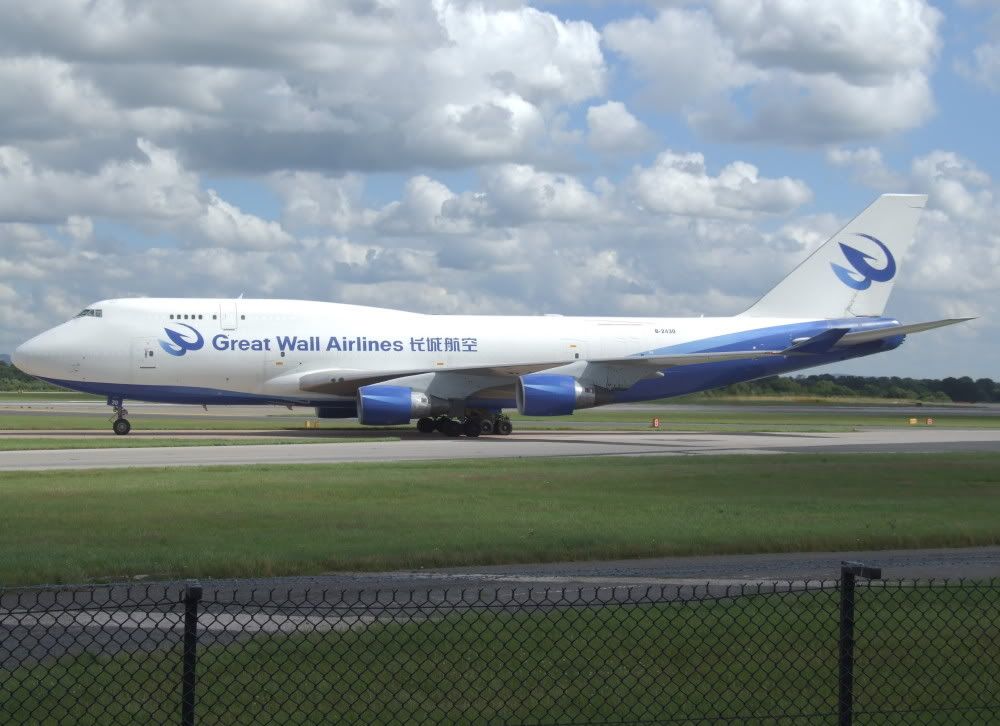
The photo below is an original, it’s just been resized.

As you can see it’s not very clear and sharp.
The next photo has been sharpened and is still rubbish.

The settings used for the original were:
Fuji S9500
1/450 (0.002s)
F/5.6
ISO 80
Exposure bias 0.33
Thanks for any help, Chris 🙂

By: Britannia - 12th July 2007 at 13:03
Thanks very much for the replies, especially Paul 🙂
Thanks Rob for pointing out some of the problems with the S9500. Must say the command dial on mine keeps going a bit ‘sticky’ and hard to turn but it then comes out of it and is fine to turn. As for the focussing problem I’ll have to try and put up with it, could be alot worse.
I’ll have a go with the settings stated by Gary and Paul at RIAT this weekend. I’ve had the camera since xmas and still working out how to get the most out of it.:rolleyes:
Cheers,
Chris
By: PMN - 12th July 2007 at 10:39
Hi Chris,
Your first original shot is better than some of mine straight out of the camera, and I shoot with a Canon 30D!
There are a couple of things I’d suggest. Firsty with regard to sharpening, maybe try leaving all processing in-camera as flat as possible (at zero), and do everything in Photoshop. The camera can only process in a way it thinks is best, which isn’t necessarily best for either the subject you’re shooting or the way you want the end shot to look, so if you tell the camera to do nothing but take the actual shot and expose correctly, you should be able to tweak the image exactly how you want it in Photoshop.
Secondly, aperture. As Rob quite rightly points out, the nose and tail appear slightly softer than the centre of the fuselage (where your camera probably focussed). This is probably because you were shooting at f5.6 so your depth of field becomes more shallow. Many lenses have a ‘sweet spot’ of sharpness where they seem to perform best, and on my Sigma 50-500 that appears to be at around f8-f11 (as it actually seems to be with most lenses). Try keeping your aperture at around f8 to keep the depth of field nice and deep.
Thirdly, your shot was taken at +.33EV, but in doing that the fuselage is quite badly overexposed. Try keeping a close eye on your histogram as you’re shooting. There are a few tricks you can use on an overexposed JPEG, but it’s still generally better to have to brighten your shot slightly than try balance the rest of the exposure against blown highlights. Your histogram is a visual reference for exactly what your pixels are outputting. To the left is the (just to use a sound term that’s more familliar to me) low (dark) end of your shot, to the right the ‘highs’ (bright), and mid tones in between. The histogram on your original image shows a big line going up the right side, meaning quite a lot of pixels are ‘blown out’. A blown out pixel is basically outputting pure white, which is actually very rarely seen in photos, and the more you overexpose, generally the more subtle detail you lose. Also if you see a line going up the left side of your histogram, you’re probably losing details in the shadows of your shot. The histogram is purely there as a guide and shooting non-aviation, histograms on some my shots look terrible, but that’s because I’m after a certain look. With aviation photography you’re generally after the shot being as technically correct as possible, so the histogram is a great help.
The shot also seems to have a slightly blueish tint, indicating the white balance was possibly set to something other than the conditions you were shooting in. Try adjusting the white balance as the conditions during the day change, so set it to ‘cloudy’ if the good old British weather decides to annoy you, and ‘Sunny’ if it decides to be kind!
I hope you don’t mind, but I did a quick edit on your Great Wall shot. Using the Shadows/Highlights tool in PS I reduced the highlights a little to lessen the effects of overexposure, increased the low levels for a little more contrast, adjusted the colour balance to try correct the blue tint, increased the saturation and sharpened a little.
The original:
And a quick edit:
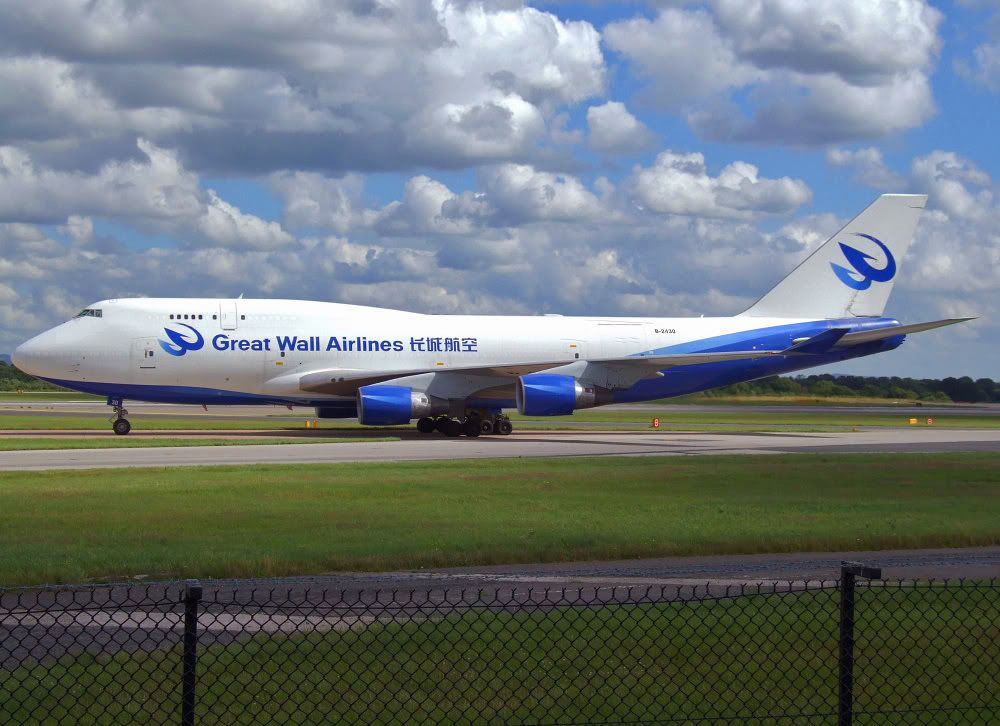
If anything I’d say the sharpness wasn’t actually the main problem with this shot, it was contrast and saturation. Even without sharpening any more, it looked better after the contrast had been increased. Notice the shot looks ‘fuller’ somehow, and the clouds have more detail.
Hope that helps, and feel free to contact me with any questions you might have. 🙂
Paul
By: gary o - 12th July 2007 at 00:32
Try using aperture priority mode,set the F number to f8 & if necessary adjust exposure with the +/-ev step
By: RobAnt - 12th July 2007 at 00:25
I’ve also learned tonight that there is a known problem with the command dial on S9500s. They are doing repairs on that FOC even if it is out of warranty.
You could ask them about that too.
They may allow you to email some examples of the problems you’re having with it.
I keep looking at your picture, and it seems to me as though the tail (and to a lesser extent the nose) is not in focus with the middle. Could this be some kind of concave/convex issue with the lens?
By: Jamie-Southend - 11th July 2007 at 21:56
Hope you get some good replies Chris, so many of mine look the same, even after a bit of work.
I have a Canon eos350.
By: RobAnt - 11th July 2007 at 21:54
mmmm – Fuji have admitted in the past that there is a focussing problem on the S9500. You could ask them to take a look at it, if it is still in warranty.
They’ve since replaced it with the S9600 in an effort to resolve the problem.
(Handy tip – Fuji sell refurbished cameras on their website – which seem to be tweaked a smidgeon over standard “off the shelf” items. And if you wanted to upgrade, they also do part-exchange).


 Sign In








 July 11, 2007 at 9:26 pm