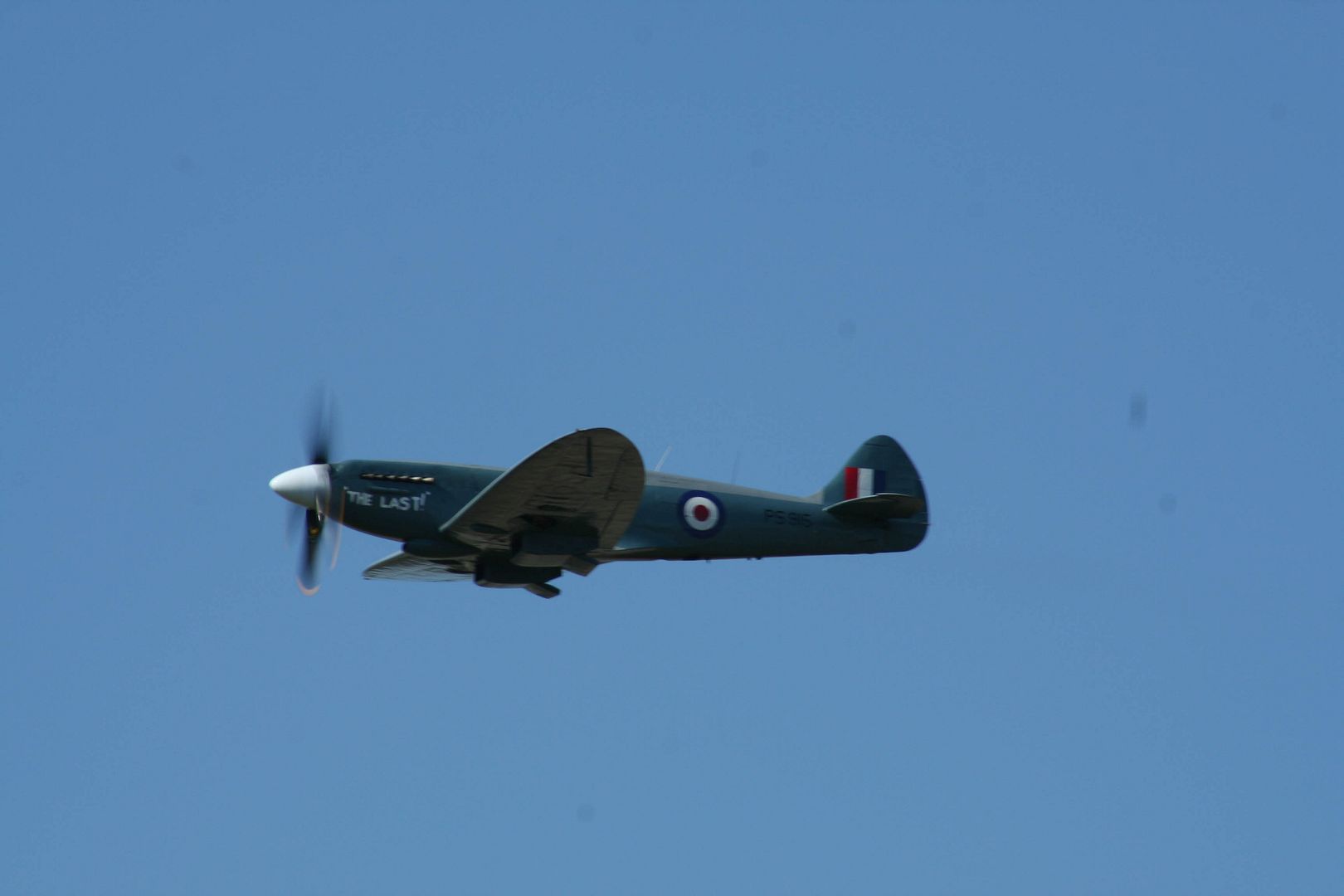
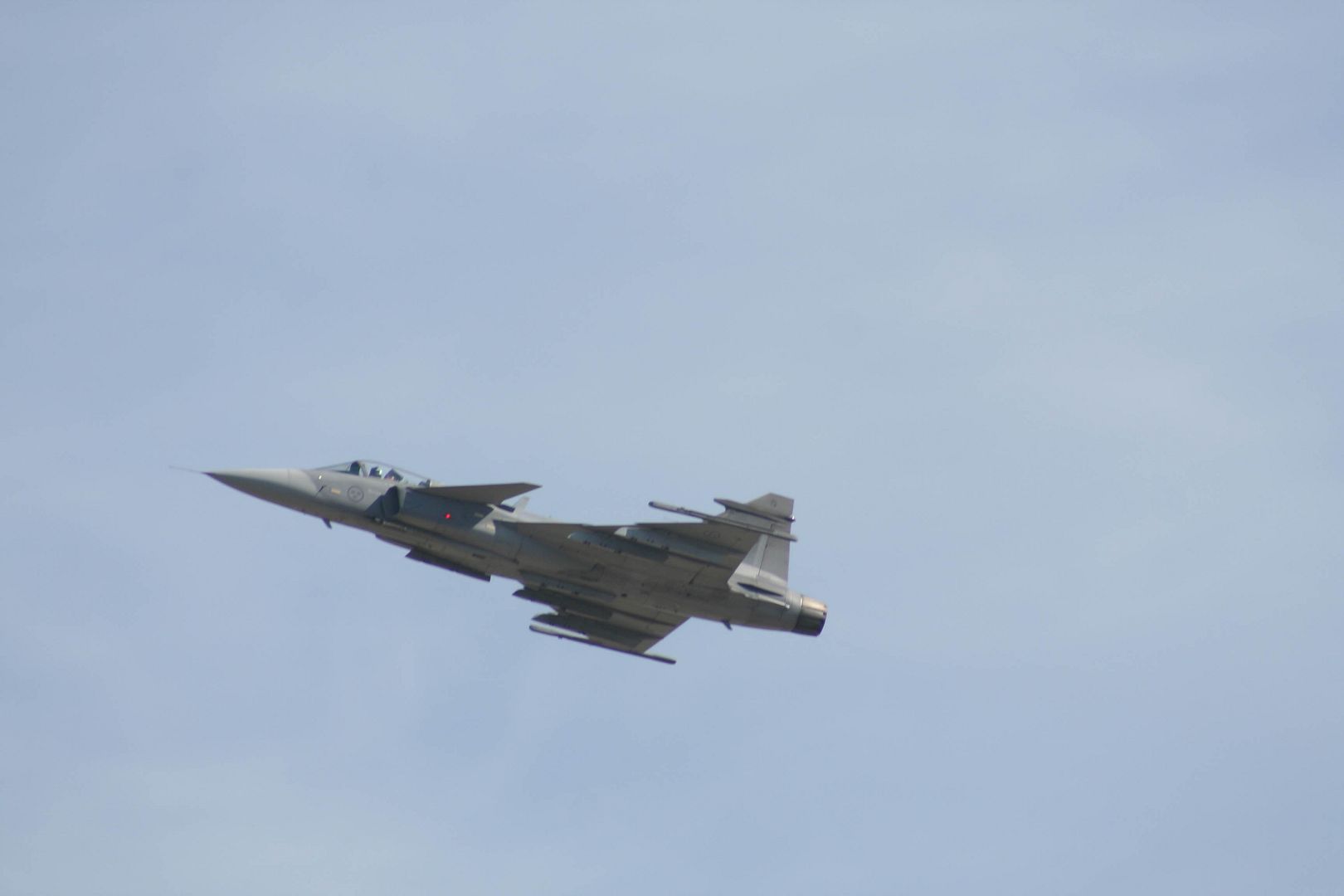
Went to Fairford on Sun, had a fantastic time and took more photos than I dare admit. Probably about 10% are quite cool but the rest are dubious to say the very least.
Loads are underexposed, very difficult to fix in Photoshop, some are overexposed so even more difficult to fix and a shedload are like these below….
Only thing I’ve done to it is reduce the size.
Really blury. I thought I’d achieved focus but it looks rubbish. I’m not too hot on focus modes on my Canon 300D /350D so maybe I’m doing something wrong there? I tried using one focus point (centre) or all 7. Or is it a problem with lense quality? The lense I had on at the time (I think) was a Canon 75-300mm usm, the cheapy one. Photos I took where the aircraft was closer are usually a lot better.
Any help would be greatly appreciated as I’m going to the Windemere airshow at end of month and want to improve my pictures!

By: mantog - 20th July 2006 at 13:43
Just posted a reply and it vanished! Will try again. Thanks Archer, your reply makes a lot of sense, I’d forgotten the crop factor in my focal length/shutter speed calculations, and I’m going to try out that focus mode…that could make all the difference
By: RobAnt - 20th July 2006 at 12:32
Robant makes a valid point about the option of resizing the image, but I think that that’s a trick you should only use once you get home and want to rescue an image to show on the internet. It is always better to start with a good shot obviously!
That is actually what I meant – resizing for your computer monitor, so you (and others) have the entire image in view.
Oh – and make that a COPY – always keep the original somewhere, and set the properties to “Read Only”.
By: Archer - 20th July 2006 at 11:32
Just my 2 cents worth about the question asked in the first post: I agree with others that lens shake is probably a big factor in producing the blurryness in these shots. You used a 300mm lens for these photos and on your Canon that equates to a 450mm lens or thereabouts in 35mm equivalent (isn’t the cropfactor of a Canon 1,5?). Now a good rule of thumb to remember is that to get sharp images with long lenses, the slowest shutter speed to use is the inverse of the focal lenght of the lens, so 450mm -> 1/450. amitch points out that many photos on this forum were taken with 1/60 or less sometimes, now I’m not saying that this isn’t possible but firstly those photos were probably taken by photographers with a lot of experience in shooting fast moving subjects, and also they didn’t show you the 20 shots or so of the same aircraft that were blurry! There is no formula that you can dial into your camera that will give you great sharp photos every time, with fast aircraft and a long lens you will need a steady hand, a good panning technique, a tripod or monopod perhaps and practice, practice and practice. To start with the rule of thumb I mentioned might help.
On the Gripen shot you had most of the factors right, but still it came out blurry so either your hand wasn’t as steady as you thought, or the focus was out. This is the second issue: your camera focuses when you press the shutter halfway, what you need then is a focus mode that keeps on focussing, thereby tracking the subject. What could have happened is that you focused with the aircraft in the distance, kept tracking it and then pressed the shutter when you had the composition you wanted. If the camera remained focused on the distance the aircraft had when you first pressed the shutter halfway then you will also get a blurry result. On Nikons the focus mode that tracks the subject is AF-C, but I don’t know if it has the same name on a Canon, check your manual for that.
Robant makes a valid point about the option of resizing the image, but I think that that’s a trick you should only use once you get home and want to rescue an image to show on the internet. It is always better to start with a good shot obviously!
Good luck!
By: Papa Lima - 19th July 2006 at 23:14
SE-LYD
I would guess that this Diamond Star has a 3-blade prop – perhaps 1/125 is a bit too fast, since I don’t have a complete propeller arc, though -any comments? I like the sparkle from the sun on the highlights, but perhaps that is “unprofessional”?
By: RobAnt - 19th July 2006 at 22:50
Ah Rob, I notice you’re a Novell type. I’m a lowly CNA!
Ditto – a CNS means Certified Novell Salesperson – one days free training at Bracknell the first time, top up online courses every year, also free, which take about 2 hours to complete. The test is multiple choice again, online and free.
Having a CNS gives me the ability to give away a five user version of Novell Small Business Suite 6.5 (NetWare version). I hope they extend that to the Linux version. But I think they might cancel the scheme altogether. Will have to wait and see.
By: mantog - 19th July 2006 at 17:08
Ah Rob, I notice you’re a Novell type. I’m a lowly CNA!
By: mantog - 19th July 2006 at 17:04
Blimey, the 350D is only a month or two old…what’s she been doing with it?!
By: RobAnt - 19th July 2006 at 15:16
The Spitfire shot was taken with your 350D, not the 300D – be sure to get the correct one cleaned.
I can tell that from the exif data embedded within the image.
By: mantog - 19th July 2006 at 14:05
I was using 2 bodies, my old 300d and my gf’s 350d, I think the dirty images are from my 300d…tried cleaning lense but it looks like the sensor is dirty….I know there are several ways to do it on your own but how much do Canon charge to do it?
By: amitch - 19th July 2006 at 07:27
It’s 1/160th, I would describe it as camera shake – but lens shake is as adequate a description as any.
I meant on this site as opposed to this thread.
Yep, I agree about the dust, but it’s not present on the Gripen shot, at least not at a normal viewing, so I assume it’s all on the lens, rather than the sensor – but he may have cleaned it.
Dust may not be visable depending on the f-stop. If this camera is new, then it needs to be cleaned. Canon is very good at sending out brand new but dirty cameras in a box!
By: RobAnt - 19th July 2006 at 00:26
Some photos you have seen here are taken at 1/60. The spit is lens shake this crop clearly shows it. There is two of everything.
SLR’s can go out to an f-stop of 32 with the correct lens, unlike point and shoots which are often restricted to an f-stop of 8.
As for dust, the spit shot is covered in it.
It’s 1/160th, I would describe it as camera shake – but lens shake is as adequate a description as any. Either way, a faster setting, say 1/250th or even 1/320 or something would help reduce it, at the expense of movement within the propeller arc.
Yep, I agree about the dust, but it’s not present on the Gripen shot, at least not at a normal viewing, so I assume it’s all on the lens, rather than the sensor – but he may have cleaned it.
By: 1946 - 19th July 2006 at 00:13
Christmas last I bought a Eos 350D with twin pack lense’s and am still learning. I find the ‘Sport’ setting handy for fast moving obect, -cars, aircraft and the like. I find the manual complex, so I have just gone and shot what I like and tried to memorise the settings to the photos to see which works the best. I like the night feature, but find it has to be used with a release mechanisn to avoid the blurr or drag image.
By: Papa Lima - 18th July 2006 at 23:47
Auto Servo does what it says on the tin – it keeps checking and correcting focus on moving objects – very handy when you’re dealing with aeroplanes!
Mind you, you do have to have a lens that is compatible with this function.
It’s all in the manual, as I say!
However it won’t help if you have camera shake (as I seem to have quite often). About 2/3 of my pix today had to be scrapped due to that pesky shake, I blame mostly the fact that I am not used to a front-heavy camera but I’m working on it, and hope for a few more days of nice weather and more practice panning on the light aircraft at Säve.
By: amitch - 18th July 2006 at 23:43
Once you’ve done that, try using the sharpening tool – the unsharp mask. This will have the effect of tightening up the images.
Judging by the amount of really great propeller movement you got into the Spitfire picture, you may be using shutter priority set just a little too slowly – use a slightly higher setting until you get better at panning.
Ahh I see that you still have the exif data attached – the shutter is really slow – 1/160 sec – raise it to 1/250th until you get more accomplished, or a longer/better lens.
Some photos you have seen here are taken at 1/60. The spit is lens shake this crop clearly shows it. There is two of everything.
If your pictures are over exposed, I don’t know how the Canon does it, but at 160th it might not have had the ability to give a high enough F number. On my camera, if it can’t get it high enough, the F number stays red, which means it’s asking me to use a faster shutter speed.
You Gripen photo was much better, and I managed to sharpen it quite nicely:
I don’t see any reason to clean your camera, but there is a smudge on the lens, I think.
SLR’s can go out to an f-stop of 32 with the correct lens, unlike point and shoots which are often restricted to an f-stop of 8.
As for dust, the spit shot is covered in it.
By: mantog - 18th July 2006 at 23:38
Thank you all for your help. Rob, I’ve had a play with Unsharp Mask…it’s very useful but it can’t undo my shoddy camera work, lol. Papa Lima, what exactly is the benefit of using Auto Servo Mode?. Amitch, you may also be right about my panning skills…and yes, that sensor is dirtier than a pig’s trotter.
By: Papa Lima - 18th July 2006 at 22:52
Sorry, RobAnt, I didn’t notice that it was you asking the Tv question – anyway, perhaps mantog can use the information I posted!
Incidentally, since I’ve only had the 350D for 3 days, I would appreciate any advice from those who have had theirs longer!
The settings I am using result from my trial and error – it’s all good practice.
By: RobAnt - 18th July 2006 at 22:42
Yes, it’s also in the exif data of the pictures.
By: Papa Lima - 18th July 2006 at 22:40
In post #1 mantog mentions a Canon 350D.
By: RobAnt - 18th July 2006 at 22:38
Tv is shutter priority AE (Auto Exposure), explained on page 82 of the manual (you do have a manual, I hope! I downloaded mine from the Canon web site, as the version I got was in German!)
Tv is one of the settings on the round dial on top of the camera, along with A-DEP, M, Av and P.
You have to go into the menu to set the servo auto-focusing, after pressing the AF part of the 4-way (arrow) button, the one with SET in the centre. This is on page 71 of the manual.
So far I have read the manual about 5 times from cover to cover, but then I am a technical author and write that kind of book!
I must say however that compared to my “old” Minolta Dimage A1 the controls on the Canon are far easier to find and use!
Haha 😀 – a manual? Me? For a Canon? No.
I don’t have a Canon, I have a Fuji Finepix S5600.
But rest assured, should I ever get a Canon, I’ll certainly invest in five minutes to download it. 😉
By: Papa Lima - 18th July 2006 at 22:28
Tv is shutter priority AE (Auto Exposure), explained on page 82 of the manual (you do have a manual, I hope! I downloaded mine from the Canon web site, as the version I got was in German!)
Tv is one of the settings on the round dial on top of the camera, along with A-DEP, M, Av and P.
You have to go into the menu to set the servo auto-focusing, after pressing the AF part of the 4-way (arrow) button, the one with SET in the centre. This is on page 71 of the manual.
So far I have read the manual about 5 times from cover to cover, but then I am a technical author and write that kind of book!
I must say however that compared to my “old” Minolta Dimage A1 the controls on the Canon are far easier to find and use!


 Sign In








 July 18, 2006 at 7:52 pm