I thought I’d write a little ILS tutorial for Flight Simulator. I hope you find it helpful even if it’s small.
To start with we’ll familiarize ourselves with the cockpit. This is the default 737 cockpit which I will use throughout.
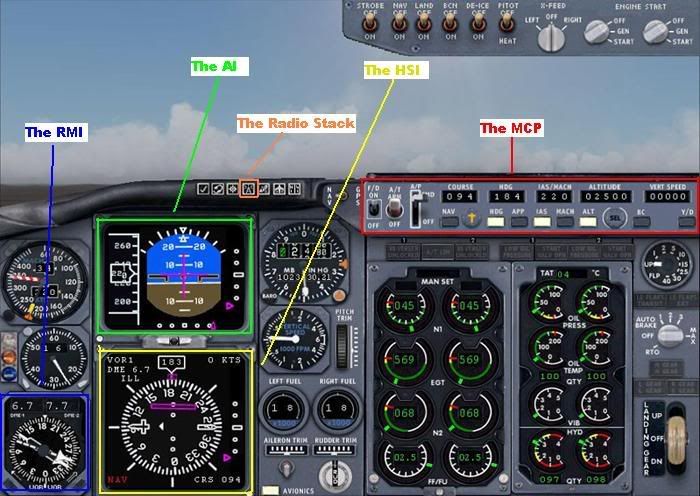
Let’s run through the various aspects
The Radio Stack
Pressing the button indicated brings up the radio stack as shown
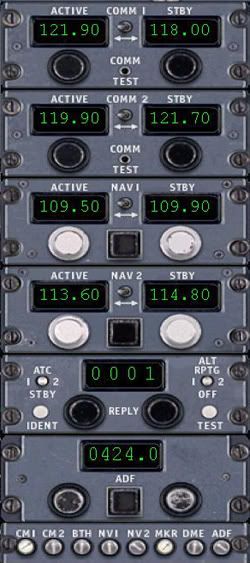
If you look down the centre you will see the labelled radios as COMM1 – COMM2 – NAV1 – NAV2 – Transponder – ADF.
What we are interested in here is the Nav1 & 2 radios plus the ADF, also at the very bottom of the stack is the IDENT buttons for each radio, these are very important too. More on this later.
The MCP (Mode Control panel)

This is basically the autopilot panel, on it you will see the flight Director, the Autothrottle and the various other Autopilot modes along with the all important course selector, all the aspects being discussed will come together later.
The AI (Attitude Indicator)
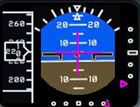
We’ll be using this to obtain our Vref in lieu of an FMC, also it shows the Glideslope & Localizer deviation in Magenta.
The HSI (Horizontal Situation Indicator)
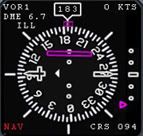
This is a wonderful bit of kit which warrants more explanation, to start with we have a rotating compass rose which always orientates the heading you are flying to North, so in this example you can see we are heading 183deg and the 183deg on the compass rose is facing north.
Emanating from the centre you can see a white bar with space in the middle that is lying East/West, with the left hand side having a dagger shape, this whole bar is called the Course Select Pointer, and the dagger part is the heading that is selected, in this case 094deg, this is depicted by the “Course” selector on the MCP above, and is also displayed on the HSI in the bottom right hand corner.
In the bottom left hand corner you can see Nav in red, this means we’re in Nav mode and not GPS mode, and in the top left hand corner it displays the Nav1 radio info if it is being received, i.e if you are in radio range, in this case we have tuned the ILS for rwy 09R at Heathrow, if the ILS has a co-located DME this will be displayed as well, in our example we are 6.7nm away. The ILS Morse IDENT is displayed too which is ILL.
When using Nav aids you must ident them, this is where the IDENT buttons come in at the bottom of the radio stack, click the Nav1 white button, you should then hear the Morse ident of IBB which will be .. / .-.. / .-..
Click the ident button off once done, the noise will get on your nerves.
On the right hand side there is a scale with a magenta triangle, this is your Glideslope information, as I am flying downwind in this example you can see that I am way above the Glideslope at the moment.
In the middle of the compass rose you can see a magenta bar, this is the Localizer info, this bar is called the CDI or the Course Deviation Indicator, because we are flying the ILS this is called the Localizer deviation bar, both the Glideslope triangle and the Loc. deviation bars are what we call “Fly To” commands, so the GS & LOC are where the magenta indicators are.
More on the HSI and particularly the course selector later.
The RMI (Radio Magnetic Indicator)
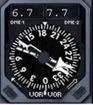
During the approach I use this for a couple of things, on the top you have 2 digital numbers, these are the DME readouts for the nav1 and nav2 radios provided the aids you tuned are DMEs or have co-located DMEs, the left one being Nav1 and the right being Nav2, in my example you can see by looking at the Radio Stack that I have 109.50 tuned to nav1 which is the ILS/DME for rwy 09R, and 113.60 tuned to nav2 which is the LON VOR/DME.
You can also use it for the ADF, so if you tune an NDB in the ADF window on the radio stack, ident it, then you can have it displaying on the RMI by clicking the black boxes in the bottom left and right corners to display “ADF” in the bottom centre, you can obviously have the ADF and another Navaid tuned at the same time.
First off we need some information for our nav radios, like the frequency of the ILS, the magnetic heading or QDM of the runway we are landing on, any nav aids like an NDB and VOR/DME etc, we can find this info in our map setting which brings up the map, you can then zoom to your airfield and double click it to bring up a window like this
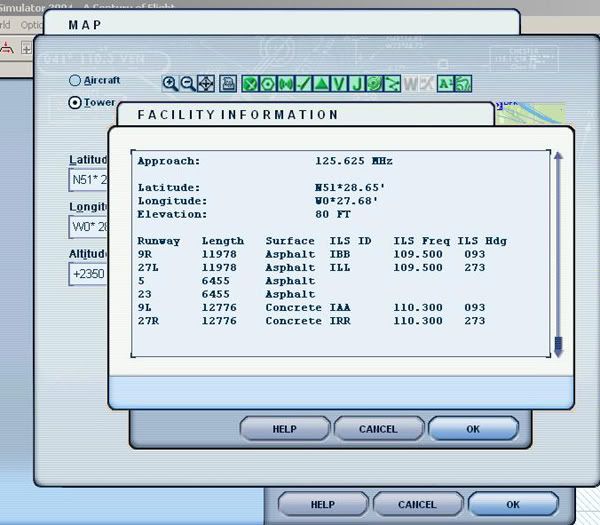
As we can see from this info we have the Runway details along with the IDENTS, the frequencies and the Runway magnetic headings, which will be your “course” heading entered into the MCP panel, this moves your Course Selector needle to the magnetic heading of the runway.
If you open this window and scroll up you will find all the relevant nav aid frequencies for Heathrow, the VOR is 113.60, the NDB is 424, enter these along with your relevant runway freq into the nav radios making sure your runway ILS freq goes in the nav1, the VOR freq in Nav2 and the NDB freq into the ADF, then set the course on your MCP to the course of your runway, in my case I am landing on 09R, so I have entered 094, you may say, well isn’t it 093? yes it probably is, but I use FSNav for my map displays, so there may be a “slight” discrepancy, use the info from whatever program you use.
Once we have all the navaids tuned and IDENTed, we are now ready to commence the procedure, now in lieu of a STAR procedure we’ll fly a circuit pattern at Heathrow and show the relevant displays in the cockpit and how you can orientate yourself using the HSI, we’ll start flying the crosswind leg shown in this picture along with our circuit pattern route for those not familiar with circuits, also we do not want to be climbing high now, so we will cap it at 2500ft, this is the normal altitude alot of airports get you at to intercept the ILS.
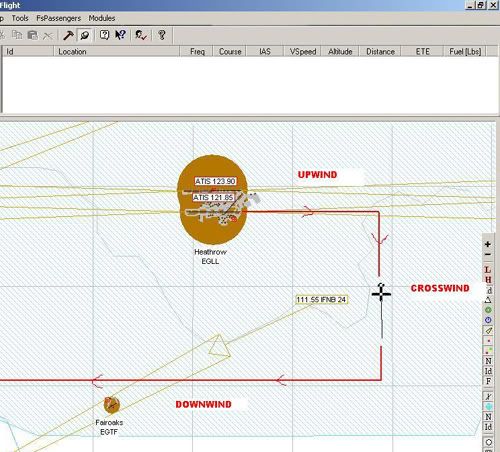
The view in the cockpit on the HSI is as follows.
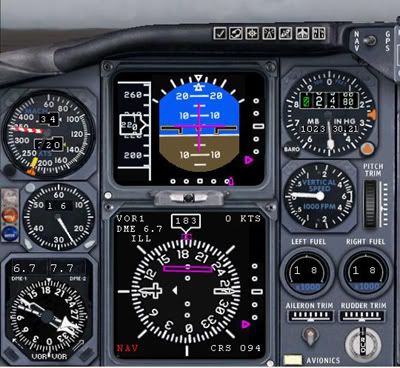
As you can see the Course Selector Needle is still pointing to 094, and if you look at the 2 pictures you can see this is the direction of the runway in relation to our aircraft with the “dagger” part of the CSN in the direction we’ll be landing in.
So we are at 2500ft, 220kts and nicely setup on crosswind.
Next the downwind leg, an FSNav picture will show our position in relation to the airfield, and is as follows
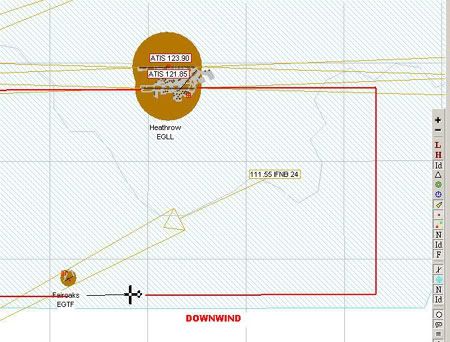
And the view from the cockpit with the Course Selector Needle still at 094
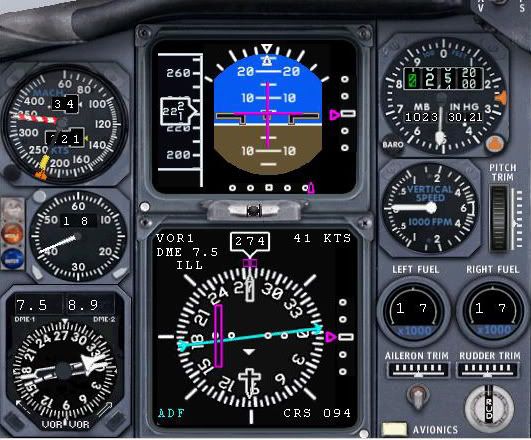
This obviously doesn’t move unless you enter a new value, but you can now see the dagger part of it pointing downwards which shows us to be on the reciprocol heading, so landing in the opposite direction. If you look at the CDI or course deviation indicator which is the magenta bar you will see if you rotated the dagger and the magenta bar so it’s pointing “north” the magenta bar will be on the right, then look at my FSNav pic above the runway is on the right, so we are still orientating ourselves using the HSI.
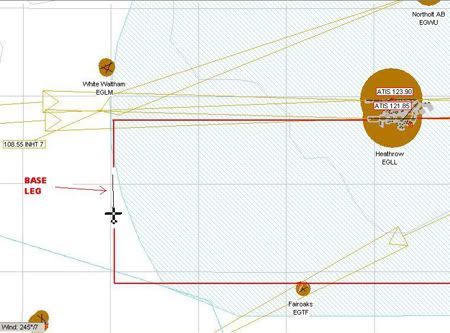
Next we are on base leg, still holding 2500ft but have slowed to 185kts, we are looking for about a 10nm intercept, what we don’t want is a 20nm final approach. This FSNav pic shows us on base leg heading to intercept the Localizer
And this pic shows the view in the cockpit, showing the HSI
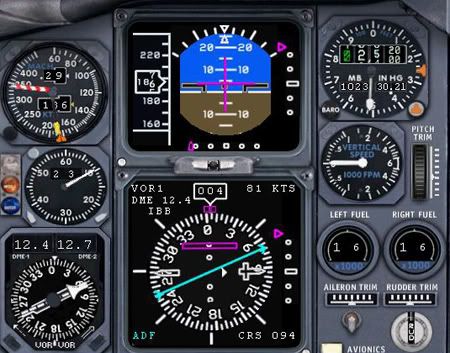
If you look at the dagger now it is pointing to the right with the magenta CDI to the “left” of it, which figures because the runway is still “left” of us if we now turned onto the runway heading from our position. Also on the HSI is the cyan pointer for the ADF, this points “To” the station at all times, so we can take a relative bearing of the ADF is necessary for non-precision approaches etc.
If you look on the HSI & the AI you will see we are well below the glideslope with the magenta Glideslope triangle way above us on the right hand scale.
Next is the Localizer intercept, if we keep going towards the localizer on our current heading we will intercept the localizer at 90 degrees, this is hard to judge when to turn to final to intercept, and the likelyhood is you will fly through the centreline, so ATC “generally” get’s you to intercept at 45deg, so we need to turn right a further 45deg from our current heading, what you would normally do now is hit the “APP” button on the MCP, this allows the autopilot to capture the LOC and has armed the Glideslope capture, this next FSNav pic shows this
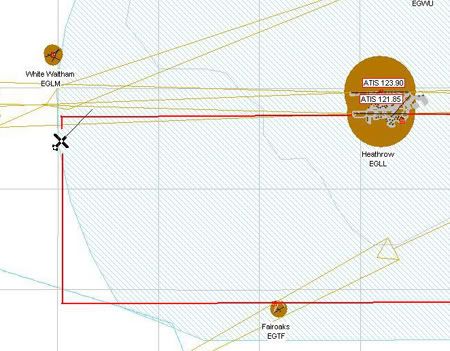
And the same view from the cockpit showing the HSI, which again is a great orientating instrument
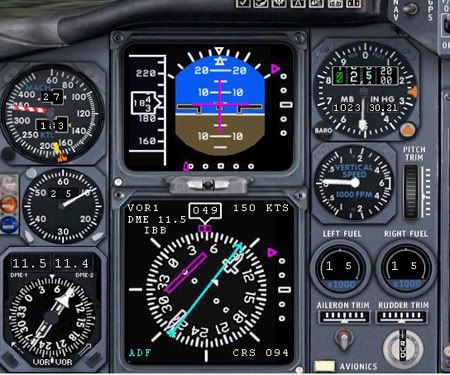
You can see the 45deg angle now on the HSI and course selector needle, if you do not have this set to the runway heading you can get in serious strife if in IMC.
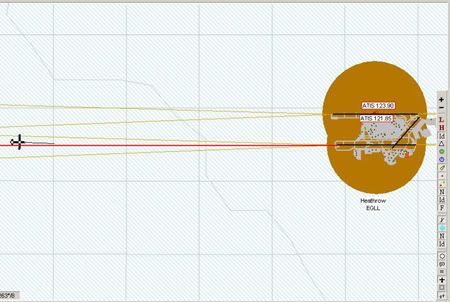
Next shows an FSNav shot of me flying slightly through the Localizer.
As you can see I have drawn in an extended centreline in red, we are left of the centreline
Next this shows the view from the cockpit, you can see on the HSI the magenta CDI is to the right, which means we must turn right to intercept it, this shot is a great example of why the correct course needs to be entered, the “dagger” is pointing down the runway and orientated at the top of the HSI when on rwy heading, if this dagger was pointing elsewhere you would find using the magenta CDI needle very difficult indeed. Also note the magenta triangle at the bottom of the AI, this is basically the same as the magenta CDI bar, so now we’re letting the autopilot track the LOC (Localizer)
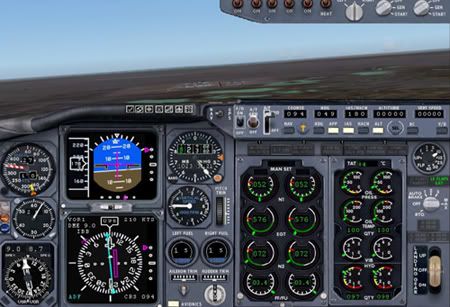
Now we’ll talk about the Glideslope and it’s deviation triangle, basically as you are flying down the centreline on the Localizer this is the situation you are presented with.
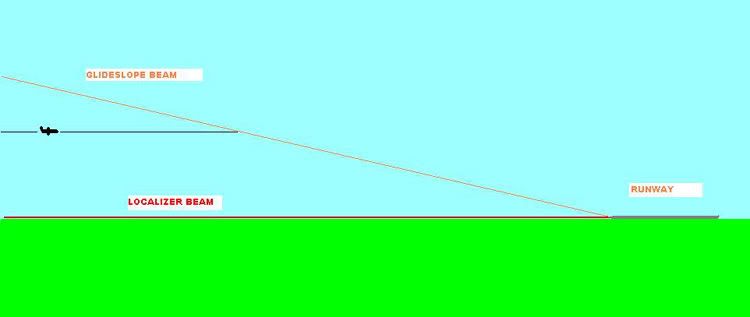
As you can see we are below the glideslope flying straight and level, eventually we will “intercept” the Glideslope beam. If you look on the HSI in the last cockpit shot you will see the Glideslope deviation triangles on the HSI & AI above the centre, you can generally only capture the Glideslope beam from below it, and as we have the “APP” pressed on the MCP it will do this automatically, as we get closer to the glideslope beam the magenta triangles will start to move down the side of the HSI & AI
You now have 2 options here, you can let the Autopilot “grab” the Glideslope, to me this always seems to be very harsh and flightsim seems to chase it a little, over correcting each time, what I do before the autopilot grabs it is to wind my altitude in the MCP window to zero, but do it as quick as possible because flightsim will put you in an 1800ft per minute descent, I zero the altitude, then quickly zero the vertical speed, so as I get closer to the GS beam and the magenta triangle moves down I start a small descent of about 400fpm, this stops the intercept being harsh if you know what I mean, it works for me.
Once established on the ILS with LOC & GS captured I can start thinking of my Vref, that is my speed across the threshold, what you look for in jet is to be about 4deg nose up attitude at Vref speed, this primarily prevents a nose in landing, you should not be at Vref at 15nm out, I aim to be at Vref about 4nm out which will be about the OM (Outer Marker) point, so fully configured, full flaps and gear down by 4nm, the follwing picture shows our Vref
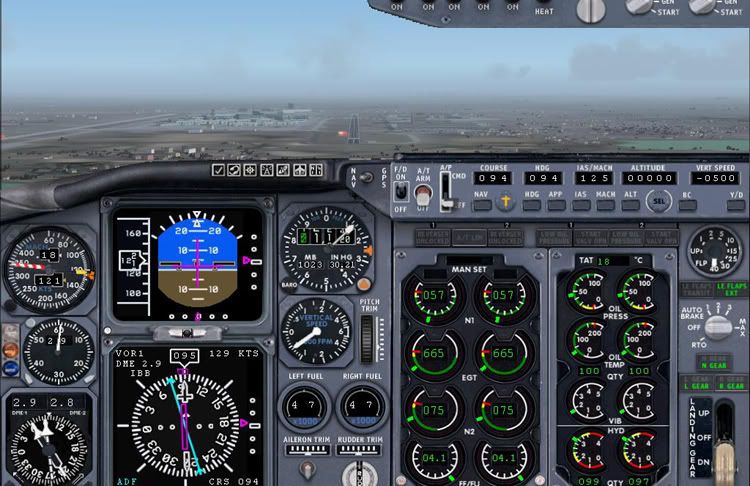
Here we have 2.9nm to run, we have a speed of 121kts which is slightly out, the replay never displays the speed correctly, it was infact 125kts, you can see looking at the AI that we have a 4deg nose up attitude, so we’re not diving it into the runway, I am actually on manual at this point hand flying it, as soon as I hit Vref I switch off the autopilot, so looking out the window here everything looks good.
To find Vref in lieu of an FMC which would give you it make sure you are descending on the GS, and make sure you are fully configured, if your nose attitude is too low then you are too fast, so slow down 5kts then wait for the change, it may need another 5kts off to get there, conversely if your nose attitude is too high then you are too slow, so increase speed by 5kts and wait for the change, remember be patient, jets are heavy and carry alot of inertia, once you hit between 3-5deg nose up you have found your Vref but again, only providing you are fully configured & descending on the ILS
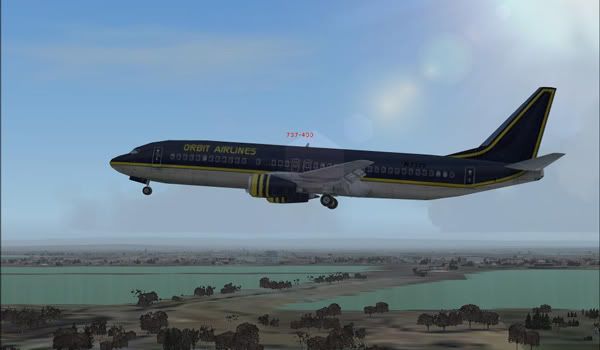
This next shot from the outside shows our slight nose high attitude whilst descending on the Glideslope.
This concludes this tutorial, I will sum a some points below, if I have missed anything please shout up.
Summary
Make sure all the nav radios are tuned and idented
Ensure the correct Runway QDM is entered into the Course Selector on the MCP
Try to be at 2500ft for the LOC & GS intercept, making sure you intercept the LOC first, then fly “into” the GS beam.
Try not to have a 20nm final approach, make it 10nm at the most, or if it is infact a visual approach make it no more than 4nm.
Use the HSI and the Course Selector Needle for orientation.
Hit Vref at 4nm or the OM, whichever is sooner.
Don’t dive your plane downwards like it is a Cessna 152, remember you’re not aiming to touch down on the threshold, but on the touchdown zone some 1000ft past it
Normally a glideslope beam is a 3 deg glidepath, to remain on a 3deg glidepath you can do a little calculation, your ROD (Rate Of Descent) should be 5 x your Groundspeed, so for a groundspeed of 140kts your ROD should be 700fpm, remember this is groundspeed and not indicated airspeed.
You can work out what altitude you need to be at as well during the approach, basically for every 1nm you are away you should be 300ft above the airfield, so if you are 5nm out on the ILS your altitude should be about 1500ft.
Good luck
Dean

By: Arabella-Cox - 18th September 2020 at 15:54
[No one does real life accurate hand flown NDB holds and arrivals…..:), ]
Utter tosh. You wouldn’t have survived long in the highland and islands of Scotland during the 1970s,1980s with that attitude.
By: Alexpers - 28th August 2020 at 11:35
Hugh, really pleased you have it sorted, that’s a relief. On with the flying now
By: Arabella-Cox - 7th May 2020 at 14:40
I think in the first post the OP states that you should be at Vref at 1 mile on the approach. Although steep approaches are often specified and required by operating procedures to be flown at Vref from the specified decent point – usually requiring full flap and airbrake (where fitted) too, it would very uncomfortable and expensive on fuel burn.
Vref is usually achieved at 50ft on an approach. Prior to that on an approach, once the aircraft is fully configured, it is flown at an additive speed determined my the manufacturer, and which then adjusted for wind gust, and/or for some aircraft, wind speed to. Typically, still air might approach might be flown at Vref +10, to Vref +20 depending on type.
If you really want to know I would suggest finding a copy of the Flight Operating Manual or Flight Crew Operating Manual (FCOM). Now, did someone say NDB approaches…
By: Arabella-Cox - 6th September 2012 at 21:09
Hey Dean, nice article you posted back in 2006 there! Cheers mate!
By: oscarwelch - 5th September 2012 at 09:52
Really nice post its very use full thanks
By: Deano - 19th May 2012 at 00:29
hmm, a Dash 8 Q400? 😀 But it does suffer from the worst ADF Dip I have ever encountered, and we’re doing about 160kts groundspeed on average, and if you leave the autopilot in it’s classed as cheating, and it is also cheating if you use the ND and FMS overlay, so in effect it’s just a big C182 😀
That’s right, I’m not sure about hand held devices though, it’s going to have to be a fixed GPS with the correct RNP capabilities. I am not sure hand helds can give this type of accuracy, especially when conducting an RNP approach. I would imagine they’d give reasonable & suitable P-RNAV performance, I guess time will tell.
By: Dave Wilson - 18th May 2012 at 17:38
Ah but what are you doing your NDB approaches in? Is it a pro bit of kit or a 172 with a non rotating card…;)
I fly from a mil airfield, be interesting to see what they intend doing regarding ILS, PAR etc. I can’t see the mil getting rid of alternatives, GPS etc is too easily jammed/offset. You’re right about a major upheaval for GA, the only way around it is for smaller stand alone GPS units to be certified for approaches. Which will no doubt multiply their price by a factor of ten. Not many people fly without at least a stand alone GPS these days (I use an Aware 5+), not particularly because the UK is difficult to nav around, but there’s just too much airspace to bust.
By: Deano - 18th May 2012 at 16:27
Yes we’ll still have ILS, but I would hazzard a guess that this will not be at every airfield in the UK. Apparently alot of the Scottish VORs are due to be decommissioned (DCS TLA TRN etc). You only have to look at what is happening with the ILS’ in this country, as they break down they are not being replaced. My home airfield Exeter Rwy 08 is a casing point.
P-RNAV/RNP approaches will become the norm sooner than we think, the issue is, the airlines are preparing for it (I’ve just done the training in the sim) but GA is not. This will force the GA industry in this country to spend an awful lot of money upgrading their fleets, or replacing them. It is going to be a messy transition for them that’s for sure.
I actually like doing NDB approaches at work, it’s a break from the norm and keeps the skills fresh, but I’m a sadist like that, non precision approaches, coupled with wind & turbulence is right up my street 😀
Good luck with the renewal when it comes around.
By: Dave Wilson - 18th May 2012 at 12:56
We’ll still have ILS and PAR. Have you noticed that NDB’s are disappearing slowly? I think VORs have a forecast shelf past 2015 (I’ve heard around 2020) as long as they can still find the bits. I can’t think of a single person I know who’ll be regretting the demise of NDB. I have my renewal in March 2014, too much to ask for them to be gone by then I suppose.
By: Deano - 17th May 2012 at 21:29
I think BlueRobin was being facetious. Your wish may come true soon. by 2015 most NDBs & VORs will be decommissioned and P-RNAV/RNP approaches will become the norm 🙂
By: Dave Wilson - 16th May 2012 at 18:46
Perhaps next you can do a guide to accurate NDB holds and arrivals? 🙂
No one does real life accurate hand flown NDB holds and arrivals…..:), ‘about right’ is as close as you’ll get. Roll on the day when we get rid of the damn things.
By: Deano - 3rd April 2010 at 13:31
Thanks for the enlightenment aarenlainey 🙂
By: aarenlainey - 3rd April 2010 at 06:44
Hey It stands for Instrument Landing System and is a precision approach. It can guide pilots right down to the runway, even in zero visibility. In many cases, there are also high-intensity lighting arrays installed to enable a safe landing. An ILS consists of two independent sub-systems, one providing lateral guidance (localizer), the other vertical guidance (glideslope) to aircraft approaching a runway. When the NAV1 radio is tuned to a localizer frequency, a second receiver, the glide-slope receiver, is automatically tuned to its proper frequency.
By: Deano - 9th January 2010 at 22:58
Hugh, really pleased you have it sorted, that’s a relief. On with the flying now 😉
Rgds
Dean
By: HughG - 8th January 2010 at 20:31
Hi, Deano,
The problem was down to me using a version of UK2000 Heathrow designed for FS2002, which I’d linked to when I installed FS2004. Once I deleted the old version and installed the version for FS2004, all the problems disappeared. The answer was at http://www.s114327879.websitehome.co.uk/heathrowpro/faq.htm (number 3)
Thanks for the various pointers and hints.
Kind regards,
Hugh
By: Deano - 6th January 2010 at 15:04
Hugh
A very interesting thread found here
It could help with your issue but you’ll have to locate the freeware scenery causing it.
Rgds
Dean
By: Deano - 6th January 2010 at 14:56
Hi Hugh
Happy New Year to you too.
I’ve never come across that before, is there anything on the UK2000 forums? Gary might have a fix somewhere, I’ll have a dig around
Rgds
Dean
By: HughG - 5th January 2010 at 14:49
Hi, Deano,
Happy New Year to you and thanks for your reply.
I was still not getting IBB when in takeoff position on 09R, nor anywhere else. However, I eventually found that if I used the scenery library to disable the UK2000 LHR that I have installed, everything worked OK.
I now need to find out why the UK2000 scenery is giving this problem.
Thanks once again for your tutorial.
Hugh
By: Deano - 27th December 2009 at 11:07
Hugh
I did a little testing on this and it seems FS will change the ident when you are over ½ way into the runway, i.e if you place yourself on 09R you’ll get IBB, if you slew down the runway you’ll ident ILL at the mid way point.
Once airborne I would imagine this would be the case too, so if you are approaching 09R from the East then it may ident ILL until you are ½ way abeam 09R if you see what I mean. This is evident in my picture but so long as you have the correct course selected for the runway then the HSI should display correctly regardless.
Wait until you are mid point downwind and then check the ident out, ensure you have 094 set in the course window
Deano, for a novice and only part-time flyer, I found this extremely helpful and instructive.
Many thanks and a Happy Christmas.:)
Sky High, thanks and a belated Merry Christmas to you too 🙂
Under what conditions does ATC enforce ILS protected areas, with their more conservative hold points, and what phraseology is likely to be used? I occasionally fly at airports with special protected hold points, but I dont think Ive ever been told to hold at one of these points as opposed to the usual hold points next to the runway. Are they used only when Cat III operations are in progress, or when Cat III might be in progress, or what? Are they used for other types of ILS operations?
AD
Normally when LVPs are in progress, if the Vis is less then 550mtrs here in the UK (subject to local procedures) then you are into CAT II territory, so the ILS has to have a protected area like you said. The CAT III hold point is normally co located with a CAT II hold should that airport be CAT III equipped.
The phraseology is not much different, they tell you hold at the protected hold instead of the normal CAT I hold.
What normally happens in LVPs is pilots will give position reports, i.e “Entering rwy xx” and “airborne” etc
Hope this helps
By: ADvonge09 - 27th December 2009 at 07:03
ILS Tutorial
Under what conditions does ATC enforce ILS protected areas, with their more conservative hold points, and what phraseology is likely to be used? I occasionally fly at airports with special protected hold points, but I dont think Ive ever been told to hold at one of these points as opposed to the usual hold points next to the runway. Are they used only when Cat III operations are in progress, or when Cat III might be in progress, or what? Are they used for other types of ILS operations?


 Sign In








 December 10, 2006 at 2:46 pm