
By: pagen01 - 9th June 2010 at 17:37
Maybe revert back to your old XP and knock the vista off and youll certainly have more memory space and the machine will work quicker for the revert back to xp.:)
I wouldn’t have a clue about that!
By: The"Eh"Team - 9th June 2010 at 17:31
I look forward to seeing your results when you get round to making your own from his prototype mk1,:).I have xp and an oldish computer and was made aware of some of the pitfalls with the “vista” software from a boffin in my local comp shop so havent really had anything to do with it in conjunction with arising snags using other programmes,”thankfully”.
Maybe revert back to your old XP and knock the vista off and youll certainly have more memory space and the machine will work quicker for the revert back to xp.:)
By: pagen01 - 8th June 2010 at 21:18
It would be good if you could send a rough diagram of the home built copier, but will understand if its something you want to keep as your own.At one time in the old SLR days slide was often too highly over rated for my liking and the only couple of E.6 film for my liking that is good for copying is Kodachrome and Agfa.
he.:):)
I should have said actually, it is a friend of mine that made and uses the homemade copier, but he uses my Pentax 750Z to do it, as he says it is the best camera for the job (great little camera anyway, and great macro).
I keep meaning to get around to makeing my own, and I will update here with the news!
Some of my slides (and negs) have come out really well from the HP scanner, but like I say it won’t do it with current windows what’s its name!
By: The"Eh"Team - 8th June 2010 at 21:06
Hi james,
Concorde shot nicely copied and a nice photo to boot and your black box system isnt that far off the “Ohnar” copier that I paid £70 notes for.I suppose the only snag with the idea is the focus problem or maybe does it work on the same principal as the ohnar and that is once focused you then just line the slide up straight to collect as much image as poss.
It would be good if you could send a rough diagram of the home built copier,but will understand if its something you want to keep as your own.At one time in the old SLR days slide was often too highly over rated for my liking and the only couple of E.6 film for my liking that is good for copying is Kodachrome and Agfa.
I now find scanning good quality prints give better results than slide film and find its only glory days were in dark rooms.I even tried copying images with a digi cam after they were put in the projector and blown up on the wall but to no avail the quality isnt the same somehow.Anyway if you manage to get to the end of this post and your still awake there is lots of fun just messing about doing this copying lark and you learn a few bits and bobs along the way.He,he.:):)
By: pagen01 - 8th June 2010 at 15:23
This was scanned in using a HP3570 which has a built in slide/neg adaptor.
However I can not get that utility to now work with latest windows even though it worked fine with XP!
Another systen that I dont think has been mentioned yet, is to make a black box afair with a slide shaped and sized hole in it and tape it to your digi camera, face it towrads the bright sky, or light source, and voila! The results can be surpringly good. Takes a bit of experimenting though.
By: The"Eh"Team - 19th May 2010 at 16:37
“Err99”
Hello PMN,
I thought a quick update might be in order to explain whats happened since your last post. I found a brilliant site called http://www.richardsnotes.org/archives/2005/04/29/50mm-lens-contact-points/ and followed most of the advice up to a point having read a fair amount of what was talked about on the site.
It runs into a lot of money buying new batteries,C/f cards and even sending it away to Canon at Elstree when the bottom line is the problem can re-occur as there is no guarantee it will solve the problem totally.My thought is maybe change over to Nikon as I havent read too much about those going wrong as much as the Canon equipment does.It would’nt be so bad if this was just restricted to old cameras but new ones alike can suffer the deadly”Err99″ syndrome.
Anyway its a throw away society and now its just a case of finding which camera is going to be the best bet in the throw away market.I know you may say in this context nothing is safe or unbreakable but a little more for thought might help me get the one that might last that little bit longer.My last 3 digi pics taken a week or so ago passing Newark museum on the back road taken from my truck.Thanks again for your interest and help.
Cheers.JB.:):):confused::confused: 


By: The"Eh"Team - 15th May 2010 at 22:29
Thanks for helpful response PMN, I guess I’ll have a go at this tomorrow as a bit frazzled at the mo, its a bit demoralising when something goes amiss with these type of cameras as not many people have much hands on experience with coping with fault finding.
Glad u liked the old images as its a lot of fun just messing about sorting through the past in photo terms and it gets a bit of a chore doing the copying but its worth it.Thanks again for suggestion and i’ll mail back with the results if they are positive.
Cheers….JB
By: PMN - 15th May 2010 at 21:29
The problem with Error 99 is that it can mean a number of things! It can indicate problems ranging from the contacts between the lens and the body being dirty so they can’t communicate properly to the on-board flash being obstructed so it can’t pop up properly. The first thing I’d personally check is the contacts between the lens and the camera. Check they appear clean, and if not try giving them a little wipe. That seems to be the most common thing that triggers this annoying error message!
Nice images by the way. 🙂
By: The"Eh"Team - 14th May 2010 at 20:38
last scans
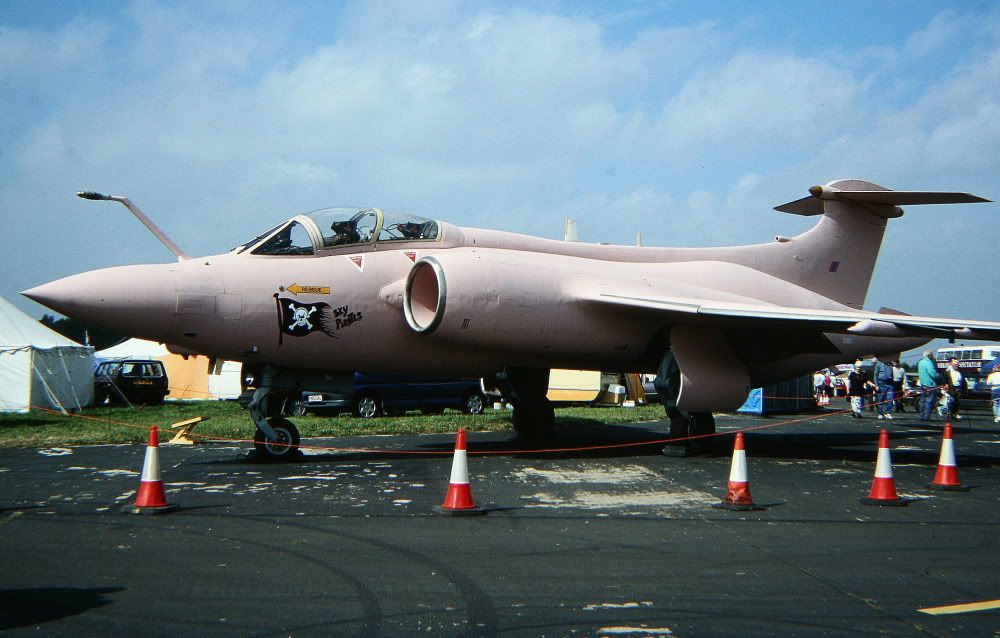
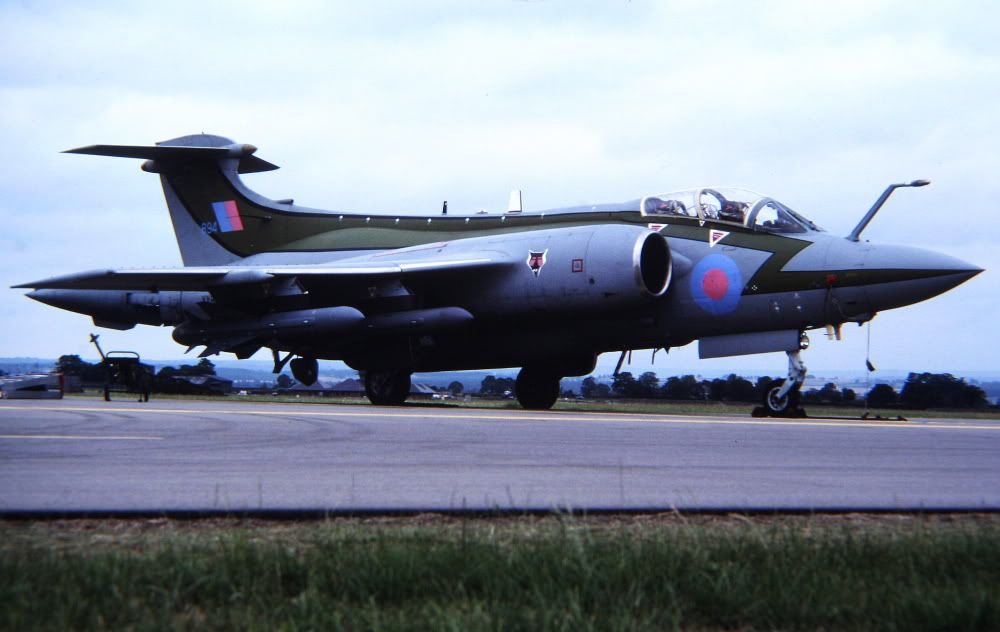
A mix of scans from various shows done as usual with my Ohnar slide copier and copied into my D350.Sadly this wont play the game anymore as the back screen keeps reading “Err 99” and it wont take photos anymore.
So if anyone can shed any light on this Canon digi fault and how to overcome it as cheaply as poss I’d be gratefull for some help as how to get it sorted.There was one place near me who were willing to calibrate it for me with my lens attached but that was around£146 and if it needed a shutter that would be an extra £90 ,costs were high as the software or machinery used to mend the camera were supposed to cost around £20,000 from the makers.
So it’ll definetively walk to the bin if I cant get it fixed for less than that.:rolleyes::rolleyes::eek::eek:Anyway some slide scans are attached just to show that the “Ohnar” copier isnt such a bad piece of kit at around £70 and wont let you down unless the camera does.:D:D 









By: gary o - 13th May 2010 at 20:58
Has anybody any example of some scans from negs?,im thinking of getting a canoscan 700f but struggling to find examples.
Thanks
By: Paul - 24th March 2010 at 15:42
Hi all,
I have to agree with everything said here. Last year I bit the bullet and bought a dedicated slide scanner..
I use a Plustex7200i. It has the IR scratch and dust removal facility but that makes the scans very,very slow So I am just doing my favourites like this. I am using the Sliverlit software that came with it and is seems to work fine. I am working at its maximum optical resolution.
The worst thing of all is dust. Even what I thought were my best slides have no end of hidden flecks
It is also very long winded process and one to do while you are doing something else or it will send you bananas!
I’m about half way through my slides (Mid 1970’s till 2002).. When I’ve finished that there will be my thirty years worth of Black and white negs to do. I will be a jibbering wreck by the time I’m finished, but it is quite nostalgic looking back over all those years… Where did the time go!
Paul.
By: Al - 22nd March 2010 at 08:48
Best thing to use is a deicated slide scanner. Mine is a Scanwit (now Acer) 2720S film and slide scanner, invaluable if you have a lot of slides to convert to digital.
The best software I’ve found is Silverfast, which actually scans the film/slide several times, and produced sharp images, with colours full of depth.
Both picked up cheap on eBay…
By: GliderSpit - 22nd March 2010 at 07:47
Take a look at Viewscan – it’s a third-party scanning program that handles a lot of older scanners. I think you can download an evaluation copy. It’s a well-known product, so a Google search should quickly locate it. The author’s name is Hammick.
Thanks for the advice. Sorry for the late reaction. I have been very busy last couple of weeks. I tried to download/install Viewscan last year, but somehow I wasn’t able to get it running. I wonder whether the Minolta Software runs using Windows 7.
By: Papa Lima - 21st March 2010 at 20:57
Gary o, as mentioned in my post #3, I cut a little window out of black card, so the only thing the scanner “sees” is the negative or slide itself.
By: gary o - 21st March 2010 at 19:33
Hey guys,i have a regular flatbed scanner,i went to scan a strip of negs but what results is just a dark strip.Not usable in anyway,i think i might get a dedicated one with all the proper holders etc,a budget of around €150 / £100 any ideas?,i see some cheaper Veho giving out 5MP size?
http://www.negativescanners.co.uk/veho-usb-negative-scanner/
By: missileer - 7th March 2010 at 18:54
I use a Minolta Dimage 5400. Was very expensive (€900,-) 4 or 5 years ago. It has a function which eliminates dust and scratches. The only downside is that this function slows down the scanner dramaticaly. Another problem was that the Minolta Software isn’t supported by Windows Vista. So I still use my old XP driven PC for this scanner.
Take a look at Viewscan – it’s a third-party scanning program that handles a lot of older scanners. I think you can download an evaluation copy. It’s a well-known product, so a Google search should quickly locate it. The author’s name is Hammick.
By: YellowAster - 1st March 2010 at 20:27
I’ve also been digitising negatives, various sizes. I use an Epson 4990 for the bigger stuff and a Plustek OpticFilm 7200i for 35mm. The Plustek was fairly cheap but does give better results than the Epson.
I used to use the Epson software for scanning – however I had a few problem B&W negs that I just couldn’t get decent results with (light colours looked dirty and grainy). Discovered VueScan, which really did do a better job – so use that now. Can be a fiddle occasionally but results are worth it.
As others have pointed out, scanning can give a “soft” image. I usually clean up the original scan in Photoshop and keep that archived. For printing I make a copy and sharpen, colour and contrast correct ,and generally muck around with that.
By: HP81 - 28th February 2010 at 13:12
I used negative colour film from the late 70’s & find the process of digitising the images very time consuming.
Some of the negatives haven’t kept well either. I use an Epson 4990 flat bed scanner & aim for an image size of around 4000 on the long side, there then follows a lot of manipulation in photoshop cs3 or 4. The fat bed scanned images are usually a bit soft, like others I tend not to make any changes to the image whilst scanning.
Here is my take on the Lanc & a before & after example of my own.
By: Short finals - 27th February 2010 at 18:25
I purchased a Coolscan 5 ED a few years back. I had heaps of problems with dust showing up on the scans (off old slides).
Anyone find a way around it picking up the dust.
cheers
I have a Coolscan V ED and it does produce great scans. A careful clean of the slide can reduce the dust to a manageable level (I assume you are referring to Kodachrome, with which the normal dust reduction function can’t be used). Apart from that, though, there is no easy solution that I am aware of.
By: Proctor VH-AHY - 23rd February 2010 at 02:53
I purchased a Coolscan 5 ED a few years back. I had heaps of problems with dust showing up on the scans (off old slides).
Anyone find a way around it picking up the dust.
cheers


 Sign In








 February 1, 2010 at 9:16 pm