Good or Bad!!
http://www.plane-spotters.net/User/gaz/photo.search
They’re not getting accepted onto high quality websites & was wondering where i’m going wrong,i’m running out of ideas :confused:
P.S. this is not a stunt to gain hits(it’s not a competition :p )

By: ivojo - 24th March 2006 at 09:39
That’s the exif data for this shot
This looks like the Fuji may have upped the exposure to try an brighten up the sky and in so doing has over exposed the plane. Try using exposure compensation or possibly the Fuji’s spot meter and meter off the plain itself rather than the whole scene.
By: Archer - 24th March 2006 at 07:46
Just a thought to add to this discussion, but some of the Fuji cameras have an ‘iso boost’ setting that automatically chooses a higher ISO setting to get you a good shutter speed. From my memory it should be off when in Auto or P mode, but since I don’t own a Fuji myself, I could be wrong there. And if I am 😉 , then this could introduce noise into the image without the photographer knowing or intending to do this.
By: Michael_Mcr - 23rd March 2006 at 20:47
Which is the “best” edit software to get?
Ultimately – Photoshop – its the big daddy and will do everything you will ever want to…and more.
However, for doing what we do with aviation pics, then Photoshop Elements (stripped down version of Photoshop) and PaintShop Pro are both very good and have everything you need for tweaking the best out of your aviation pics.
PaintShopPro has the edge, in my opinion over Photoshop Elements and you can get the last version of PaintShopPro (ver 8) at knock down prices on the internet – ive seen it advertised for £12 which is a totally legit retail version with serial number.
At that sort of money, you can also budget on a decent book about using the software – there are many books about now which show how to process digital pictures on a pc to get best results.
By: coanda - 23rd March 2006 at 19:21
go go gadget moderator…….
By: Moggy C - 23rd March 2006 at 18:55
Unless anybody can come up with a reason why not I intend to move this over to the photography forum.
The demo of what can be done with the Aer Lingus shot will have more value and interest over there, and last longer near the top of the pile too.
Moggy
Moderator
By: coanda - 23rd March 2006 at 18:25
irfanview is a good start (since its free!) give it a google!
there are trials for most programs (adobe photoshop/elements, paint shop pro….etc)
By: gary o - 23rd March 2006 at 17:58
Which is the “best” edit software to get?
By: Michael_Mcr - 22nd March 2006 at 20:25
Gary,
http://www.freeserifsoftware.com/ for a legal and totally free copy of PhotoPlus 6 or download a trial copy of “PaintShop Pro” for a 30 day tryout of a very serious photo editor which has all the functions you could ever want for tweaking the very best results out of your pics.
Do try this – i assure you that you will be totally astounded at how much you can improve the quality of pics on your pc once you have the hang of using a program like this – it is what EVERY serious aviation photography buff does – shoot it simple in the camera and then spend some time improving the image on the pc.
Regards
Michael
By: gary o - 22nd March 2006 at 18:46
Ok,i’ll try that then
By: coanda - 22nd March 2006 at 17:59
well, you really want sharpness to be as little as possible, and the colour to normal. you need to be setting quality and size to max.
then try it out round the house………do it at a number of different settings so that you can see the difference.
your results will be worse if you sharpen even more.
By: gary o - 22nd March 2006 at 14:37
I’ve had a fiddle with my camera settings,made the sharpness as hard as possible & colour to vivid,as for shutter speeds/exposure times,the manual is not very clear,I don’t think i can adjust it either??,i’ll need to go to the airport before i can test them out ,so i hope the weather gets warm!
By: Michael_Mcr - 22nd March 2006 at 09:48
Gary,
This edit isnt by any means perfect, but what i have tried to do is give the picture a bit more punch by bringing the light levels down and adding more colour saturation. I have tweaked the sharpness slightly, but cant really add much as it has already been sharpened.
The general consensus amongst photographers is that you should turn all camera sharpening and image adjustment down (or off), which then leaves you free to control these adjustments much more delicately using an editing program on your pc like photoshop or paint shop pro. You may wish to also try using gamma adjustment software to calibrate your pc monitor for brightness, so that you can adjust the brightness levels of your pics to be in line with other peoples screen – that is often the reason for over bright picture adjustment.
Regards
Michael
By: coanda - 21st March 2006 at 19:55
hope your iso really wasnt 16032!!
is 1024×768 what you get out of the camera?
also,
1.what other settings besides ‘NORMAL’ do you have in the sharpness menu?
2.same goes for the quality mode (almost certainly the great majority of the problem)
3.1/550 is pretty quick (well for me anyway!) using shutter priority will help
4.what did you do to the image after taking it from the camera?
By: gary o - 21st March 2006 at 19:29
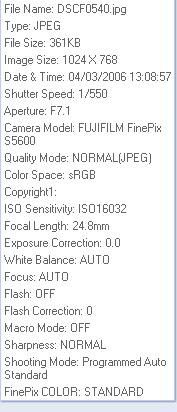
That’s the exif data for this shot

By: coanda - 21st March 2006 at 19:04
yep, looks like they have been artificially lightened, since the colours are de-saturated somewhat. Your also suffering from heat haze in some, which is often down to the fact that your soo far away from the subject.
The image itself, whilst well composed, is not sharp, and is very noisy. At a guess (a good one…….) both faults can be attributed to the camera. Did you use digital focus? Don’t!
Program leaves all the decisions to the camera. Bad move! read the instruction booklet again, and get familiar with aperture priority, and shutter priority modes. On a little camera like that, you can shoot fine at 1/200 of a second, at whatever F-stop that produces. Also check what metering mode your using (centre weighted is a good one) AND………always use the highest image size and resolution you can, even if it means going out and buying more cards…….I can’t emphasise this enough, because even if you do take a good, well composed, sharp, well lit image, it will still look crap after the camera has done its worst compressing and re-sizing.
Just so that I don’t come across as all-talk……this is from fairly recently…….
hope this helps, and keep working on it!
By: RingwaySam - 21st March 2006 at 17:49
Gary, I’ve only used my 300D so im not sure that the Fuji is like. Try changing the ISO to 100 or below, if you can for sunny days. When it’s pretty crappy weather you need to shoot at ISO100-200. ISO200 may catch abit of noise so try not to go for shots that are close-ups etc… If you want, maybe could post some of your EXIF data for your shots.
As Jon said though, I would say the shots are overexposed (Some) and noisy :rolleyes:
By: gary o - 21st March 2006 at 17:44
I leave the dial to “P” as i heard that’s the best setting to use,no idea why!,where could i get photoshop from?
By: BHXlocal - 21st March 2006 at 17:40
Ahhhh right, i use the S5000, well not for much longer 😀 It is well know for the colour to be a bit off in the fuji’s but if you edit them to a good standard, the come out fairly well, as i have quite a few on A.net and also JP.net with the S5000.
I think with the over-exposure problem, i presume you leave it on auto? Try not to over do it with the editing, if you need any assitance, i have Photoshop CS2 and maybe try out the editing and see if that will benefit you.
Hope this helps you
By: gary o - 21st March 2006 at 17:35
To be honest my camera is not the best,it’s a Fuji Finepix S5600 which is at the lower end of the price scale,the problems i have are noise & sharpness in particular,i was thinking about my editing software (HP image zone),but whatever i change it doesn’t help in solving nosie & sharpness problems.The ISO settings i use are not greater than 200,which is supposed to limit noise.How would i combat over exposure,bearing in mind the sunlight was at my back for those few photos.
By: Raymy - 21st March 2006 at 01:12
What are you using to edit your shots gary ? Aer Lingus can be very problematic to edit correctly ( as well as Easyjet).
Decent enough shots but some look like they have been over edited.
Raymy.


 Sign In








 March 20, 2006 at 9:01 pm