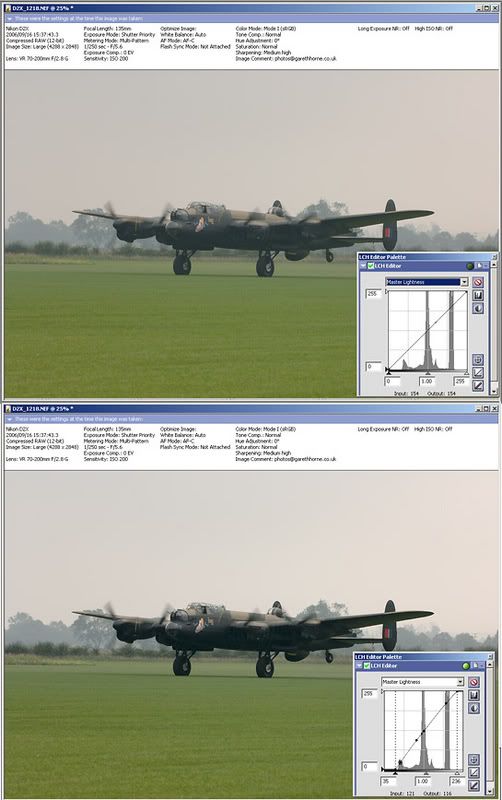
they did 2 fast taxi runs DS (plus a standard low speed taxi earlier in the afternoon, my second photo when the light was much better!). According to the cameras EXIF data I make the first fast taxi run 9 seconds ‘tail up’, and the second in excess of 11 seconds. Pretty impressive for the first time in public!
Incidentally I notice a few folks stating there photos didn’t come out as well as they had hoped. Probably just need a touch of curves adjustment, mine looked very flat out of camera, there was so little contrast by then. Quick and easy adjustment in any image editing programme –
http://img.photobucket.com/albums/v37/GarethHorne/curves.jpg
cheers everyone, no sign of PA474 unfortunately Lancman. Visibility was very poor, particularly towards the end so there was only one arrival – a Booker Taylor Titch!
All my images have the EXIF data intact, assuming you are using Firefox just right click on a photograph and choose properties, all will be revealed. For those on other browsers, just follow the link in my sig and choose ‘show EXIF’ in any of the photographs you are interested in.
WOW. Fantastic set of images, thanks for posting them.
Excellent set Gary (wonder how many more times we stand chance of seeing a Air Atlantique liveried Dak?). Pity it crossed with Breighton, would have loved to have been there myself.
Thanks all. Paul – not sure about the exact engine type but G-BUTX has a smoke system fitted, which may have a bearing on the cowling shape.


I had a similar thing happen when I put a 2Gb card in my Nikon D100, the camera never recognised the card, it may be just a case of down loading an update for the camera, otherwise just stick to 1Gb cards as I did.
Septic.
Yep, that’s basically it, you need firmware 2.0 (released 2003?) which introduces FAT32 support to use large cards with the D100. Once upgraded my D100 is happy with 2 and 4GB cards.
The 350D is a much newer camera however, and should support big cards straight out of the box.
No problem 🙂
Sadly yes, Photoshop 7 doesn’t natively handle camera RAW images. (The ‘RAW’ files mentioned in the help file are for ‘undocumented formats, such as those created by scientific applications’ rather than the proprietary camera file formats created by Nikon, Canon etc, unfortunately Papa Lima).
CS 2 and later versions of Photoshop Elements have raw converters built in, but support was never retrospectively made available to the earlier versions. If you were processing camera RAWs in Photoshop 7 Moggy, it was because you had a plug-in installed for that particular file type.
No, your version of Photoshop (7.0) will not open Nikon D70S raw files as it is John. You have the option of installing a plug-in from Nikon to allow as this (to a very limited extent, no adjustments bar exposure and white balance being possible), or upgrade to the latest version on photoshop that will allow D70S RAW files to be fully manipulated.
Personally I prefer to use Nikon Capture to process my raw files which are then passed over to photoshop for finishing off as web jpgs. Its available as a 30 day free trial if you want to experiment with it. I’m still with Photoshop 7 too and this method works well for me.
The halo and oversharpening are definitely processing artefacts I’m afraid John, rather than heat haze. (which means it should be easy to get rid of them since it was taken as a raw image). Here’s what I mean by a halo, it goes from dark, to white to light.

and here is the stair stepping problem

As I say they are purely artefacts introduced in the processing stage so it should be an easy remedy.
But will reduce the file size by a useful 25% or so.
Some people are still on dial-up.
Moggy
Nope, file size is identical. For example
a 600 pixel wide image at 300ppi
74783 bytes(74KB)
the very same image, same level of compression, at 72ppi
74783 bytes (74KB). Identical. Pixels and level of compression used affect file size, not PPI setting.
The only difference is if you print the images the first one will be 2 inches wide, the second one 8.33 inches wide (and that is assuming you are printing from an application that understands the ppi tag, and the PCs printer driver does not rescale the image to fit the paper being used)

But it is saved at 300 ppi….
Which won’t make a blind bit of difference to what it actually looks like on screen, its still a 1000×1510 image being displayed in a web browser.
Whilst I appreciate that’s rather large for a post on a forum (half that would be plenty) messing with the ppi tag (that’s all it is, a data tag, correctly ignored by the vast majority of programs) is a red herring as far as solving the problem being presented. Sort out the sharpening issue first, then decide on the size (in pixels) you want for the image on screen.
I’d be happy to look at the original for you if you like John, Nikon users like ourselves often seem to be in the minority 🙂
Its quite badly oversharpened, you’ve got visible halos on the light/dark boundaries and stair stepping on the diagonals. Try backing off the unsharp mask when processing.
If photoshop is a bit daunting give Infraview a go, its ok for free and does an easy ‘resize for web’.
hth
this one ?

Looked like the normal Breighton showmanship to be honest, I’ve often seen the biplanes dancing round those trees and the hangars to the north of the strip. I was similarly impressed by the intimate nature of the action when I first visited, make the big shows seem pretty staid in comparison.